Starting a dropshipping business is an exciting journey. You get to pick a niche, design cool products on Printful, and sell them to the world. It feels like the perfect way to make money online. However, there is a hidden trap that many new store owners fall into. That trap is having a slow website.
WooCommerce is a free tool for building a shop, but it can be heavy. When you sync dozens of high-quality product images from Printful, your WooCommerce store needs a lot of power to run smoothly. If your pages take too long to load, customers will get frustrated. They will likely click the “back” button before they even see your designs. As a result, you lose your hard work.
This is where your choice of hosting becomes the most important factor.
How Kinsta Hosting Optimize WooCommerce Printful Store
Before I switched, I was using Namecheap for my store. It was frustrating because even the WooCommerce dashboard would load slowly. Simple tasks like checking an order or changing a price felt like a chore. Moving to Kinsta removed that lag completely. Now, managing the backend of my shop is fast and easy.
Kinsta Hosting for WordPress and WooCommerce Stores
Is your Printful store lagging? See how Kinsta Hosting optimizes WooCommerce for instant page loads and viral traffic. Boost your dropshipping sales today!
Product SKU: WooCommerce
Product Brand: Kinsta
Product Currency: USD
Product Price: 35
Product In-Stock: InStock
5
Easy One-Click WordPress Installation
When you first open the MyKinsta dashboard, you have two simple choices. You can either request a free migration or build a new site yourself.
If you choose to build it yourself, Kinsta automatically handles the hard work by installing the latest versions of WordPress and PHP. You then get to pick from 44 data center locations around the world.
On the next screen, you can set your WordPress username and password. Every site at Kinsta includes a free SSL certificate. They also generate a temporary URL (like sitename.kinsta.cloud) so you can test your shop before it goes live.
Why Speed Matters for Printful Stores
When you sell custom products using Printful, your images are your most valuable asset. You cannot sell a t-shirt if the customer cannot clearly see the design. To make sales, you need high-resolution mockups that show every detail of your artwork. However, these high-quality images come with a file size.
If you upload dozens of large images to a standard hosting plan, your website becomes slow. Consequently, when a visitor clicks on a product, the page might take several seconds to load. Most shoppers will simply close the tab and move to a competitor.
The Solution: Kinsta CDN Caching
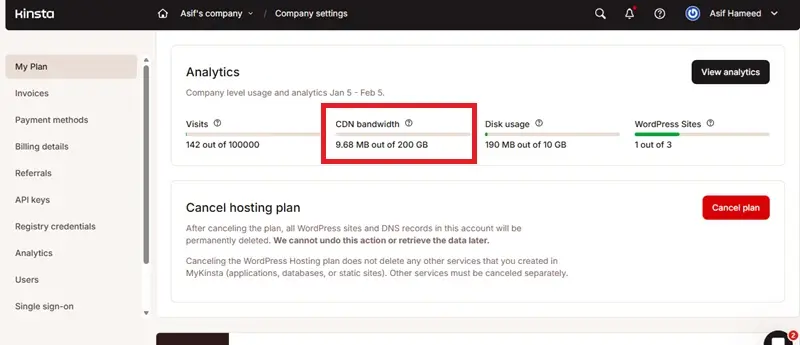
This is where Kinsta offers a massive advantage. Every Kinsta plan includes a free Content Delivery Network (CDN) to keep your store fast for shoppers everywhere. You can easily track your usage inside the Kinsta analytics dashboard to see how much data you have left. If your store goes viral and you use more than your plan allows, the extra cost is very low. Kinsta only charges 0.05 USD/GB for any extra bandwidth you use.
To understand how Kinsta CDN caching works, imagine that your website lives on a server in New York. If a customer visits your shop from London, the data usually has to travel all the way across the Atlantic Ocean. This distance causes a delay, known as latency.
Kinsta fixes these issues by storing copies of your website’s data in over 260+ locations around the world. Therefore, when that customer in London visits your store, Kinsta serves the images from a server right there in London.
Handling the “Heavy” WooCommerce Database
Running a blog is simple because every visitor sees the same text and images. Running a WooCommerce store is much more complex. This is because an online store is “dynamic.” Every time a customer adds a shirt to their cart, calculates shipping, or applies a coupon code, the website has to create a unique page just for them.
Standard caching cannot save these pages because they change every second. Therefore, your server has to work much harder. If your server is weak, the “Add to Cart” button will feel slow and sticky. This lag destroys trust and lowers your conversion rate.
The Printful Connection
The situation gets even trickier with Printful. Your store is constantly talking to the Printful app to sync inventory, update prices, and check shipping rates. This connection happens through the API. Every time you sync a new product, it creates a lot of work for your site’s database.
On cheap shared hosting, this heavy workload can slow down your entire site. You might even notice that your WordPress dashboard freezes while you are trying to add new designs.
The Solution: Kinsta Compute-Optimized Servers
Kinsta fixes the speed problem by using the best technology on the planet. They run your store on Google Cloud’s premium network. Furthermore, they use the newest compute-optimized servers. These are built specifically to handle heavy tasks like running a WooCommerce shop. They process the complex “database queries” that WooCommerce generates without breaking a sweat.
Consequently, your store stays snappy even when you are syncing 50 new products at once. The admin panel loads quickly, allowing you to manage your business efficiently. More importantly, your customers enjoy a smooth checkout process. The transition from the product page to the payment screen is seamless, which helps you secure more orders.
Preventing Crashes During Ad Campaigns
The goal of almost every dropshipper is to go viral. You likely spend money on Facebook Ads and TikTok to get people to your store. Ideally, one of these ads takes off, and thousands of visitors flood your site in a matter of minutes. This should be a moment of celebration. However, for many store owners, it turns into a disaster.
On standard “shared” hosting, a sudden traffic spike can crash the server. If your website goes down while your ad is running, you are literally burning money. You pay for the clicks, but customers land on a broken page.
No More “Bad Neighbors”
Kinsta prevents this by using isolated container technology. To understand this, think of cheap hosting like living in a crowded apartment building. If your neighbor throws a loud party, you suffer. If another site on your server gets busy, your site slows down.
Kinsta gives your store its own private house. Your website gets its own dedicated software resources, including Linux containers and LXD. You do not share your CPU or RAM with anyone else. Therefore, a busy website on the same network will never affect your store’s performance.
Free premium DNS service
It is important to note that Kinsta does not sell domain names. They focus entirely on providing high-performance hosting rather than acting as a registrar. Therefore, you will need to buy your web address from trusted domain services like NameSilo or Hover to register your name.
After you buy your domain, you just update your settings to point to Kinsta. Furthermore, Kinsta gives you a premium DNS service for free. This service is powered by the rock-solid Amazon Route 53 network.
If you don’t have a name picked out yet, you can still start working. Kinsta provides a temporary domain for every new site. Consequently, you can build your WooCommerce Printful store right away without spending money on a name. When you are ready to launch, you can switch to your custom domain with just a few clicks.
My Test Results (The Review)
To see if Kinsta was really worth the money, I put it to the test. I set up a demo WooCommerce store and imported 50 distinct products from Printful. I used high-resolution mockups for t-shirts, hoodies, and mugs. Then, I compared the performance on my old “budget” host versus Kinsta.
The difference was not just small; it was huge.
Speed Test: Before and After
First, I ran a speed test using GTmetrix, a popular tool for measuring site performance.
- Old Host: High server response time, resulting in a “B” grade.
- Kinsta: Low response time with a performance grade of “A” (98%).
My Test Setup
I didn’t use a blank page for this test. Instead, I built a real store on the Single 40k plan. I made the page quite heavy at 4.29 MB by adding several high-quality product images from Printful. This represents a real shopping experience.
My store earned an average score of 96%. Surprisingly, the site was almost instant in Canada and the USA. Furthermore, the technical numbers that Google loves were very strong. My LCP (Largest Contentful Paint) was just 1.37 seconds.
However, I did notice that the speed dipped a bit in South Africa and the UK. The heavy page size of 4.29 MB made it harder for the data to travel to those specific spots during my test. Even with those slower times, the site felt stable and smooth. Overall, these scores prove that Kinsta can handle a busy dropshipping store without any issues.
The “MyKinsta” Dashboard
Beyond speed, using the dashboard was a joy. Most hosts use cPanel, which looks old and confusing. Kinsta uses a MyKinsta dashboard. It is clean, modern, and easy to understand. I could see my visitor stats, check my bandwidth usage, and clear my site cache with just one click. It felt like using a modern app on my phone.
How Much Does Kinsta Cost?
Kinsta is a premium hosting provider, so their prices are a bit higher than basic shared hosting. Their managed WordPress hosting plans are designed to grow with your business. All Kinsta plans come with free CDN bandwidth and a free SSL certificate. Moreover, they offer free migrations.
The Single 40GB plan costs $42 per month. This is the best choice if you have one WooCommerce store. This plan easily handles up to 65000 monthly visits. It also provides more PHP workers, so your store can handle many customers checking out at the same time. Consequently, your site won’t crash during a big holiday sale.
What Do Other Customers Think?
It is always a good idea to see what real users have to say before you commit to a new host. I checked the most popular review platforms to see how Kinsta stacks up. Across the board, they maintain some of the highest scores in the hosting industry.
Here is a quick look at their current ratings:
My Final Verdict
Kinsta provides the speed to keep customers happy and the power to handle viral sales spikes. You no longer have to worry about your site crashing and loading slowly. Instead, you can focus entirely on creating designs and growing your revenue.

I highly recommend moving your store to Kinsta. It was the best decision I made for my dropshipping business. If you are just starting and have zero budget, a cheap host might be okay. However, if you are serious about making money with WooCommerce, you need a solid foundation.